
This article builds on the material I present at True North Dreamin’, held in Toronto on May 11–12, 2026.
I’ll start by showing you a Lightning Web Component solution built without any modern platform capabilities, one that calls Apex for everything, just like all the components you create.
Then we’ll fix it. Step by step, we’ll introduce capabilities that are brand new (@lwc/state, Database.PaginationCursor), ones that have always been best practice forever (lightning/uiRecordApi), and one you probably haven't considered at all for Salesforce, IndexedDB.
At each step, we’ll measure what changed and why it matters.
You can find the full code here: sandriiy/tnd26-lwc-opportunity-radar: An Opportunity Radar experience built for True North Dreamin 2026 in Toronto
What’s the problem with Apex-only implementations?
The best way to start this journey is to ask yourself what’s the problem with using only Apex controllers and building Lightning Web Components like this:
import getOpportunities from '@salesforce/apex/OpportunityRadarController.getOpportunities';
import createFollowUpTask from '@salesforce/apex/OpportunityRadarController.createFollowUpTask';
import updateNextStep from '@salesforce/apex/OpportunityRadarController.updateNextStep';
import updateCloseDate from '@salesforce/apex/OpportunityRadarController.updateCloseDate';
import updateStage from '@salesforce/apex/OpportunityRadarController.updateStage';

export default class OpportunityRadar extends LightningElement {
    // ...

    async handleCreateFollowUpTask(event) {
        await createFollowUpTask({ opportunityId, subject, dueDate });
        await this.loadOpportunities();
    }

    async handleUpdateNextStep(event) {
        await updateNextStep({ opportunityId, nextStep });
        await this.loadOpportunities();
    }

    async handleUpdateCloseDate(event) {
        await updateCloseDate({ opportunityId, closeDate });
        await this.loadOpportunities();
    }

    // ...
}
It is clear. It is simple. It works. But that does not mean it is good.
The problem is that this kind of implementation pushes almost every responsibility to the server. Every click, every search, every scroll, every refresh becomes another server request. The browser waits, the network adds latency, and the user gets a spinner… again.
Analyzing solutions like this, I never cease to be amazed by the amount of red in DevTools.
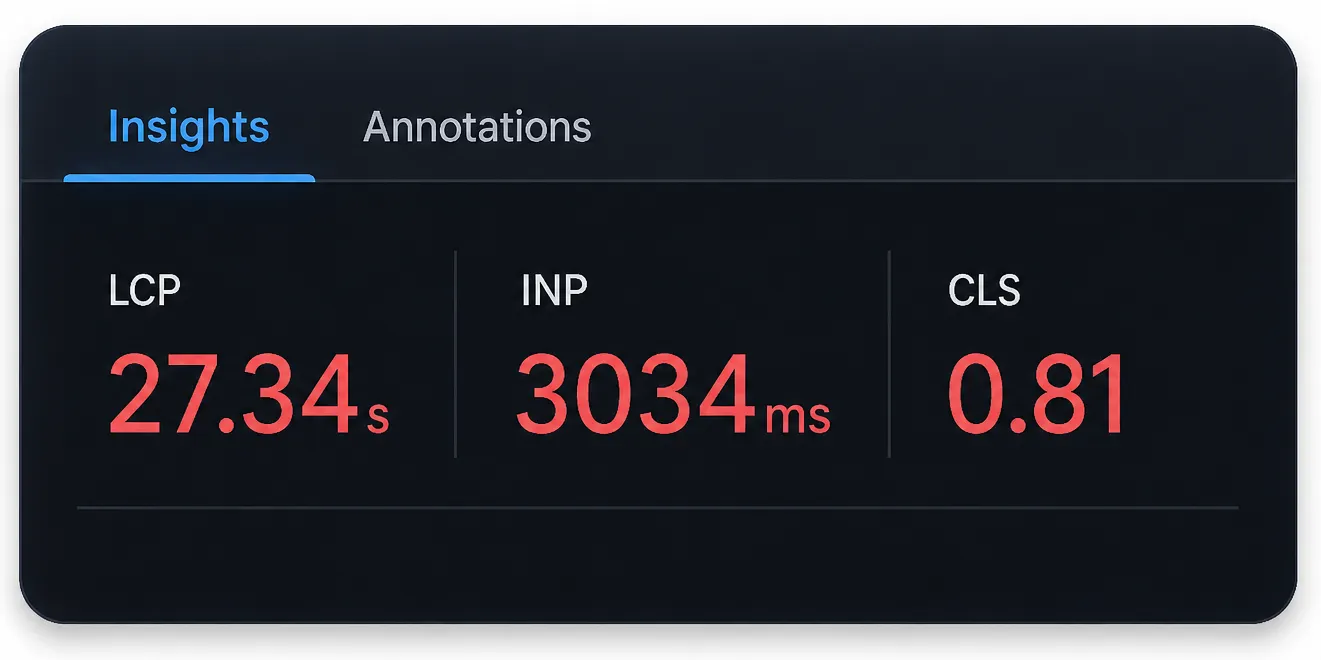
27 seconds to render the main content and 3 seconds to respond after a user interaction… With delays like that, even a “headless” might start to look like a good idea.
And this is only the visible part of the problem. Other reasons include:
- Over-fetching, returning “everything just in case” makes the network payload bigger, slows down rendering, and wastes time on data the user may never see.
- Security, when everything goes through Apex, you are responsible for enforcing sharing, CRUD, and field-level security. Miss one check, and the UI can expose data the user was never meant to see.
- Large datasets, loading too much data in a wrong way makes the UI slower with every new record, until the component eventually becomes unusable.
- Offline-friendly patterns, if the browser stores nothing and reuses nothing, even a small network issue turns the whole experience into a waiting game.
Use Lightning Data Service (LDS)
This is the easiest way to improve performance and add reactive behavior to your components. It allows you to stop writing Apex for basic record operations and hand it off to Salesforce, which will also be able to automatically cache and update the record across multiple components.
For reference, take this line of code from an Apex-only implementation:
import updateNextStep from '@salesforce/apex/OpportunityRadarController.updateNextStep';

async handleUpdateNextStep(event) {
    const { opportunityId, nextStep } = event.detail;
    await updateNextStep({ opportunityId, nextStep });
    await this.loadOpportunities();  // full reload
}
Looking at this function, two obvious questions appear:
- Why do I need to call
this.loadOpportunitiesevery time to update the view? - Do I even need a custom Apex method named
updateNextStephere?
The first question is correct. If a user updates a record in the UI and you update it in the database, why do you need to retrieve the same record from the database again?
The second question is not stupid either. If Salesforce gives you LDS to update a record, why are you writing custom Apex for the same thing?
📌 Okay, so how do we actually call LDS?
Well…. We don’t 🙂
Not directly. LDS is not a function you call like this: LDS.updateRecord(). It works behind the scenes, and Salesforce gives you components and modules built on top of it. In this case, the module we need is lightning/uiRecordApi, because it provides the updateRecord function.
So instead of calling custom Apex and then reloading the whole list, the code now look like this:
// Import lightning/ui*Api Built on LDS
import { updateRecord } from 'lightning/uiRecordApi';

async handleUpdateNextStep(event) {
    const { opportunityId, nextStep } = event.detail;
    await updateRecord({ fields: { Id: opportunityId, [NEXTSTEP_FIELD.fieldApiName]: nextStep } });
    this.patchOpportunity(opportunityId, { nextStep });
}

patchOpportunity(id, fieldDelta) {
    this.allOpportunities = this.allOpportunities.map(opp => {
        if (opp.id !== id) return opp;
        return enrichWithRisk({ ...opp, ...fieldDelta });
    });
}
Behind the scenes, a lot of optimization and processing happens during an updateRecord call, including:
- Reactive behavior, Salesforce will notify other components that use LDS for the same record, so they can receive the updated data without you manually doing anything.
- Client-side caching, Salesforce keeps track of records in the LDS cache and reuses as much data as possible instead of going back to the server every time.
- Security handling , LDS respects platform access rules like CRUD, FLS, and sharing.
This brings us to the numbers below.
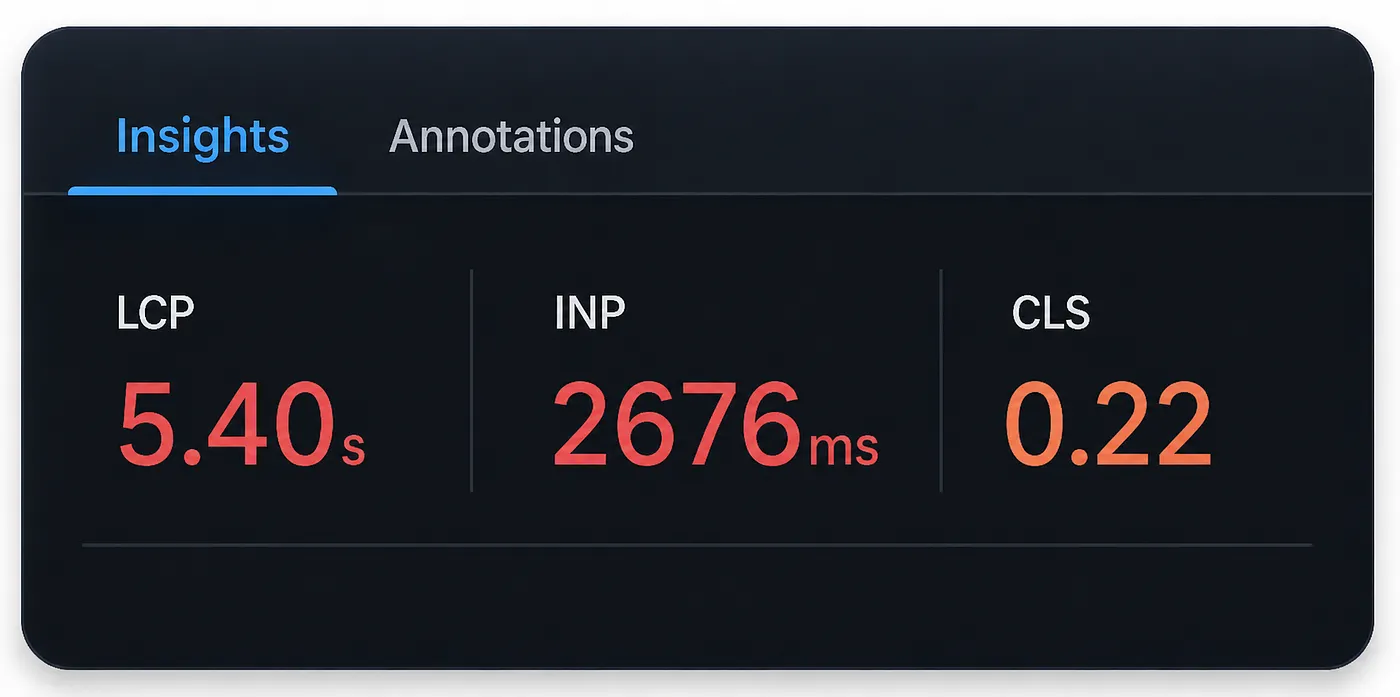
The metric we care about the most here is INP, which measures how quickly the page responds after a user interaction. LCP and CLS in Salesforce can fluctuate because of the platform, page layout, standard components, network conditions, and other things outside of our custom LWC.
State Management
Now let’s move on to a new capability that is generally available in Summer ’26, State Management.
This is a centralized place to manage all data and changes across your Lightning Web Components. It extends across the entire component tree (parent → child → child and so on) and gives you precise control over which dependencies update and which don’t.
At first glance, this does not look like a performance improvement tool. It looks more like a better way to control the data management process.
And that is true. State Manager is designed exactly for that: managing state in a cleaner, more predictable way.
That being said, once your state is centralized and your data flow is easier to understand, it becomes much easier to spot performance problems.
In our Apex-only implementation, after switching to State Manager, I noticed this getter:
get visibleOpportunities() {
    const paginated = this.filteredOpportunities.slice(0, this.currentPage * this.filters.pageSize);
    return paginated.map(opp => ({
        ...opp,
        isSelected: opp.id === this.selectedOpportunityId
    }));
}
What happens here is that when a single opportunity changes, this getter executes, creates a completely new list of objects, and forces every card on the screen to re-render. Every single one.
State Manager lets you spot those problems.
It lives as a separate utility component structured like this:
import { defineState } from '@lwc/state';

export default defineState(({ atom, computed, setAtom }) => {
    // ...
});
We use the newly introduced defineState function to define the values and actions our state manager exposes.
Inside it, we declare every piece of state we want to control. For our implementation it looks like this:
const allOpportunities = atom([]);
const snoozedIds = atom([]);
const selectedId = atom(null);
const filters = atom({ ...DEFAULT_FILTERS });
const isLoading = atom(false);
const hasError = atom(false);
const errorMessage = atom('');
const lastRefresh = atom(null);
const currentPage = atom(1);
An atom represents a single, reactive piece of data. Unlike a plain variable, an atom is a wrapper that plugs the value into the reactive graph, which is exactly what lets the runtime build a precise map of what depends on what, instead of blindly invalidating everything.
Then computed comes in:
const visibleOpportunities = computed(
    [filteredOpportunities, currentPage, filters, selectedId],
    (filtered, page, f, sid) =>
        filtered.slice(0, page * f.pageSize).map(opp => ({ ...opp, isSelected: opp.id === sid }))
);
Here we declare that visibleOpportunities depends on four values (filteredOpportunities, currentPage, filters, selectedId). If any of them change, it recomputes. If none of them change, it doesn’t, regardless of what else happens in the application.
When we need to update an opportunity, we do it like this:
const patchOpportunity = (id, fieldDelta) => {
    setAtom(
        allOpportunities,
        allOpportunities.value.map(opp =>
            opp.id !== id ? opp : enrichWithRisk({ ...opp, ...fieldDelta })
        )
    );
};
setAtom is the only way to write to an atom, direct assignment is not allowed. Every mutation must go through setAtom, which is what allows the runtime to intercept the change, walk the dependency graph, and determine the exact minimum set of things that need to update.
The most important part is that, in this version, I am not recreating the entire list of opportunities like I did before. Instead, I update only the opportunity that actually changed.
That kind of problem becomes much easier to spot when your state logic is centralized in one place.
To counterbalance this once more, this spread syntax (...) was literally creating a new object for every opportunity and putting all of them into a new list.
allOpportunities.value.map(opp => ({
    ...opp,
    isSelected: opp.id === selectedId
}))
So, we added a state manager. How much did it improve performance in this case?
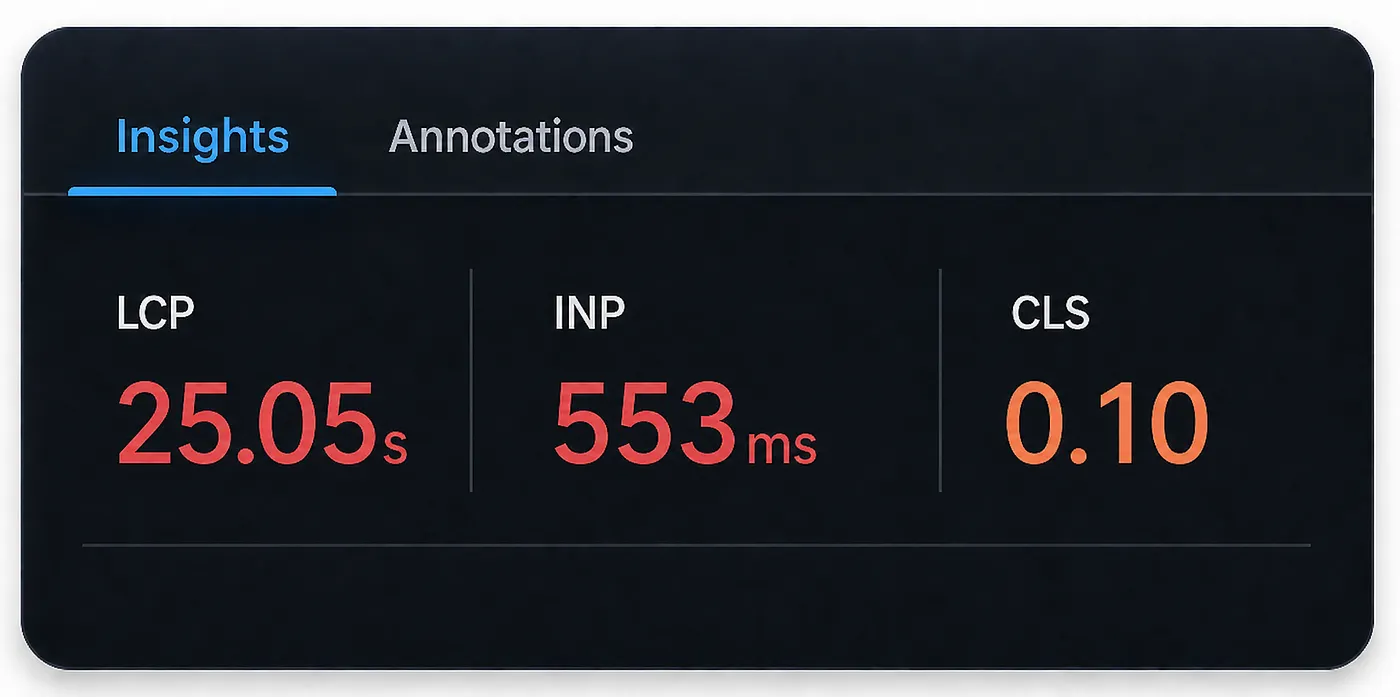
An incredible 553 milliseconds of INP. Compared to the previous value of 2676 milliseconds, the interface now responds to user actions 4.84× faster than before.
If that’s not an improvement, I don’t know what is.
Browser Persistence Layer
Up until now, we have been optimizing the UI starting from the moment all data has been received from Apex. What if we could optimize the initialization process as well?
At the moment, the load function looks like this:
const loadFeed = async () => {
    setAtom(isLoading, true);
    setAtom(hasError, false);
    setAtom(errorMessage, '');
    try {
        const raw = await getOpportunities();
        setAtom(allOpportunities, raw.map(opp => enrichWithRisk({ ...opp, isSelected: false })));
        setAtom(lastRefresh, new Date().toLocaleTimeString());
        setAtom(currentPage, 1);
    } catch (error) {
        showError(error);
    } finally {
        setAtom(isLoading, false);
    }
};
We get the list of opportunities from Apex and pass them to the state manager for storage.
And here I ask myself: What if the data hasn’t changed since the last time the user opened this page? Why do we have to reload all the records every time? Why can’t we store them in the user’s browser?
If you’re at all familiar with browser storage, you’ve probably come across localStorage and sessionStorage. These are your go-to options for storing data on the client, but they’re typically used for lightweight stuff, things like active filters or language preferences, not for large amounts of data.
For large amounts of data, IndexedDB is the right tool. It’s a NoSQL database built directly into modern web browsers. It can handle large amounts of data and comes with features like indexes and cursors.
In our case, we’ll create a new utility component opportunityRadarCache that will be responsible for opening, reading from, and writing to IndexedDB:
const DB_NAME = 'opportunityRadar';
const DB_VERSION = 1;
const STORE_NAME = 'opportunities';

function openDB() {
    return new Promise((resolve, reject) => {
        const request = indexedDB.open(DB_NAME, DB_VERSION); // open or create a database
        request.onupgradeneeded = (event) => {}; // goes here is it's being created
        request.onsuccess = (event) => resolve(event.target.result); // goes here if it's being opened
    });
}

async function readOpportunities() {
    const db = await openDB();
    return new Promise((resolve, reject) => {
        const tx = db.transaction(STORE_NAME, 'readonly');
        const request = tx.objectStore(STORE_NAME).getAll(); // read data
    });
}

async function writeOpportunities(records) {
    const db = await openDB();
    return new Promise((resolve, reject) => {
        const tx = db.transaction(STORE_NAME, 'readwrite');
        const store = tx.objectStore(STORE_NAME);
        store.clear();
        records.forEach(record => store.put(record)); // store data
    });
}
Now that we have IndexedDB set up, with an object store called opportunities to hold our records, and two functions to read and write data, we can update our loadFeed function like this:
const loadFeed = async () => {
    setAtom(hasError, false);
    setAtom(errorMessage, '');
    setAtom(currentPage, 1);

    let hasCachedData = false;
    try {
        const cached = await readOpportunities();
        if (cached.length > 0) {
            setAtom(allOpportunities, cached);   // render immediately from cache
            hasCachedData = true;
        }
    } catch (e) {}

    if (!hasCachedData) {
        setAtom(isLoading, true); // spinner only when there is nothing to show
    }

    try {
        const raw = await getOpportunities();
        const enriched = raw.map(opp => enrichWithRisk({ ...opp, isSelected: false }));
        setAtom(allOpportunities, enriched);
        setAtom(lastRefresh, new Date().toLocaleTimeString());
        try {
            await writeOpportunities(enriched);
            markSynced();
        } catch (e) {}
    } catch (error) {
        const statusCode = error?.body?.statusCode;
        if (statusCode === 401 || statusCode === 403) {
            try { await clearCache(); } catch (e) {}
        }
        if (!hasCachedData) {
            showError(error);
        }
    } finally {
        setAtom(isLoading, false);
    }
};
I’ve introduced IndexedDB into the process. Since it’s a persistent store, it can live in the user’s browser indefinitely. That’s why we still call Apex to refresh the data, but that call now happens in the background. The user gets their first render in ~50ms from IndexedDB, and Apex runs silently behind the scenes to update any records that have changed.
This is where state management earns its place a second time. Because our reactive graph only re-renders what actually changed, swapping in the fresh Apex data doesn’t re-render the entire HTML, only the records that differ get updated. That’s awesome.
On that note, let’s come back to localStorage and sessionStorage, I used both of them to improve the user experience as well.
Their fundamental difference is:
- localStorage is a small persistent storage in the browser. It keeps its values even after you close the browser or reboot your machine.
- sessionStorage is a small temporary storage. It keeps its values until you close the tab. Some browsers restore tabs after a reboot, so it may technically survive one, but you shouldn’t rely on it.
In our case, I introduce both into the state manager to restore context when the page loads. This doesn’t improve raw performance, but it makes the app feel like it remembers and cares about the user:
// storage keys, namespaced and versioned to avoid collisions
const PREF_KEYS = {
    riskFilter: 'opportunityRadar:v1:riskFilter',
    compactView: 'opportunityRadar:v1:compactView'
};

const SESSION_KEYS = {
    selectedId:  'opportunityRadar:v1:selectedOpportunityId',
    snoozedIds:  'opportunityRadar:v1:snoozedIds'
};

// read once at module init — before any atom is created
function readPreferences() {
    const riskFilter = localStorage.getItem(PREF_KEYS.riskFilter);
    const compactView = localStorage.getItem(PREF_KEYS.compactView);

    const saved = {};
    saved.riskFilter  = riskFilter;
    saved.compactView = compactView === 'true';
    return saved;
}

function readSession() {
    const sid = sessionStorage.getItem(SESSION_KEYS.selectedId);
    const snoozedRaw = sessionStorage.getItem(SESSION_KEYS.snoozedIds);
    return {
        selectedId: sid || null,
        snoozedIds: snoozedRaw ? JSON.parse(snoozedRaw) : []
    };
}

export default defineState(({ atom, computed, setAtom }) => {
    const savedPrefs = readPreferences();   // from localStorage
    const savedSession = readSession();        // from sessionStorage

    // set detault values if any
});
And finally, let’s take a look at the INP metric and see how we’re doing:
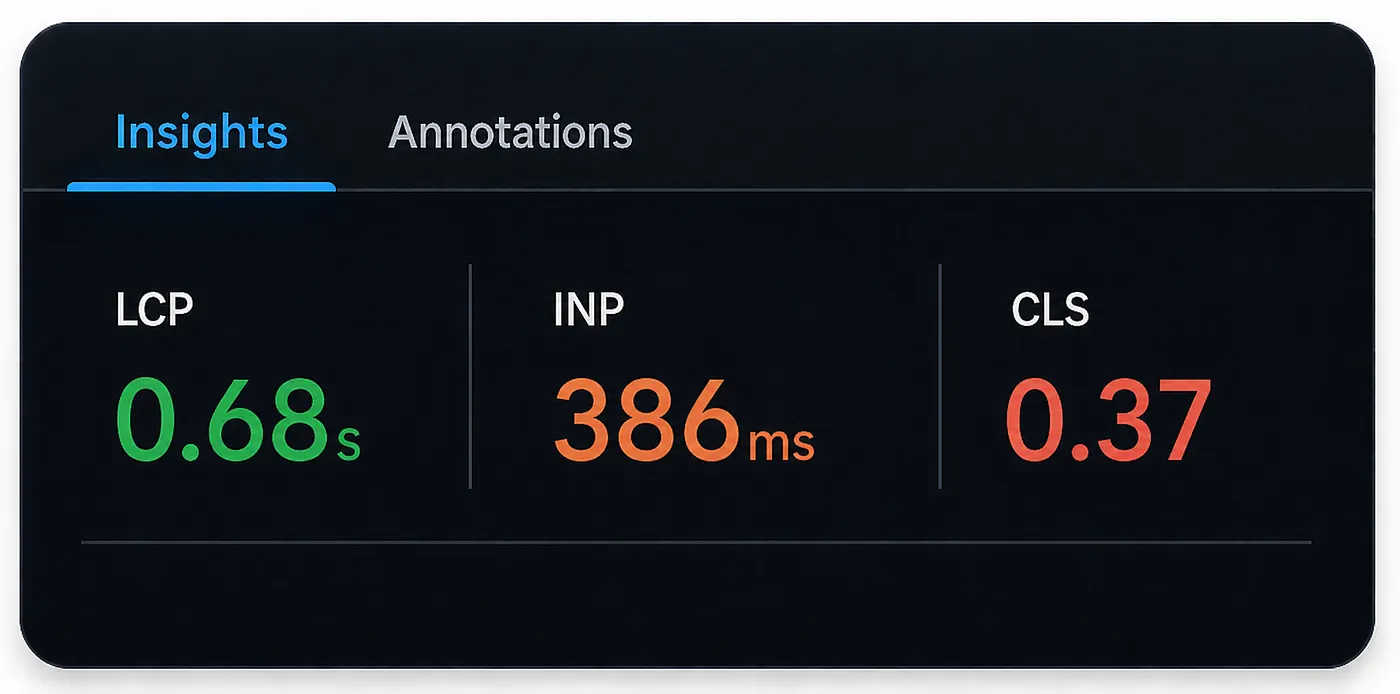
Our user responsiveness improved by another 167 milliseconds. And although this does not look as dramatic as the improvement we got with the state manager, look at the LCP metric.
Yes, I told you not to focus too much on it. LCP shows how long it takes for the largest visible content element to render when the page loads, and in Salesforce, this metric is affected by too much platform stuff. That is still true.
But in this case, the improvement is too big to ignore. Whatever we changed definitely contributed to this number, because the initial page load is now much more efficient.
And this is the first time we get green somewhere.
Apex Cursor for Deep Pipeline Scan
And now we only have to take care of one thing: data transfer from Apex to the Lightning Web Component.
At this point, we have optimized the Lightning Web Component to its maximum capacity, including the initialization process, loading previously cached data and synchronizing it with the database in the background.
But there is still one aspect that has not been addressed: Apex transfers all opportunity records to the Lightning Web Component at once, and there we add them to IndexedDB and implement pagination on the client side:
// Query all at once
private List<Opportunity> queryOpportunities() {
    Id currentUserId = UserInfo.getUserId();
    String baseQuery = 'SELECT Id, Name, Account.Name, StageName, Amount, CloseDate, Owner.Name, '
        + 'NextStep, LastActivityDate, LastModifiedDate, Probability, ForecastCategoryName '
        + 'FROM Opportunity WHERE IsClosed = false'
        + ' AND OwnerId = :currentUserId'
        + ' ORDER BY CloseDate ASC NULLS LAST LIMIT 50000';
    return Database.query(baseQuery);
}
// Write to IndexedDB
async function writeOpportunities(records) {
const db = await openDB();
return new Promise((resolve, reject) => {
const tx = db.transaction(STORE_NAME, 'readwrite');
const store = tx.objectStore(STORE_NAME);
store.clear();
records.forEach(record => store.put(record));
tx.oncomplete = () => resolve();
});
}And as you can see, even such an approach can work. We were able to optimize the Lightning Web Component quite significantly given that this code was in place the whole time. But this is still not the approach I’d recommend.
We need to implement pagination between Apex and the Lightning Web Component, where Apex transfers data in chunks, and if the user asks for more, we fetch the next chunk from Apex.
This is made possible, without any OFFSET workarounds, thanks to the Pagination Cursor in Apex, which has been generally available since Spring '26.
The way it works: you create a cursor by passing your SOQL query as a parameter, like this:
Database.PaginationCursor pagCursor = Database.getPaginationCursor('SELECT Id, Name FROM Account');This creation step does not fetch any records yet, it creates a snapshot of the query result set that you can page through across multiple transactions.
Later, when you need to fetch records, you call:
Database.CursorFetchResult page = pagCursor.fetchPage(0, 200);The advantages of this approach are: first, you can fetch up to 100,000 records, which is double the limit of a standard SOQL query. Second, you can retrieve records in any range by offset, and you avoid all sort of problems that come with OFFSET in large datasets.
In our case, we replace this:
private List<Opportunity> queryOpportunities() {
    Id currentUserId = UserInfo.getUserId();
    String baseQuery = 'SELECT Id, Name, Account.Name, StageName, Amount, CloseDate, Owner.Name, '
        + 'NextStep, LastActivityDate, LastModifiedDate, Probability, ForecastCategoryName '
        + 'FROM Opportunity WHERE IsClosed = false'
        + ' AND OwnerId = :currentUserId'
        + ' ORDER BY CloseDate ASC NULLS LAST LIMIT 50000';
    return Database.query(baseQuery);
}
With this, using the Pagination Cursor:
public CursorPage fetchOpportunitiesPage(String cursorToken, Integer batchSize) {
    // ...

    // Either resume an existing cursor or open a new one.
    if (String.isNotBlank(cursorToken)) {
        CursorToken token = (CursorToken) JSON.deserialize(cursorToken, CursorToken.class);
        pagCursor = (Database.PaginationCursor) JSON.deserialize(token.cursorState, Database.PaginationCursor.class);
    } else {
        pagCursor = Database.getPaginationCursor(
            'SELECT Id, Name, Account.Name, StageName, Amount, CloseDate, Owner.Name, '
            + 'NextStep, LastActivityDate, LastModifiedDate, Probability, ForecastCategoryName '
            + 'FROM Opportunity WHERE IsClosed = false'
            + ' AND OwnerId = :currentUserId'
            + ' ORDER BY CloseDate ASC NULLS LAST'
        );
    }

    // Fetch the current page by offset
    Database.CursorFetchResult fetchResult = pagCursor.fetchPage(startIndex, size);
    List<Opportunity> opportunities = new List<Opportunity>();
    for (SObject s : fetchResult.getRecords()) {
        opportunities.add((Opportunity) s);
    }

    // ...
}
An important property of the Pagination Cursor is that it is serializable. Rather than opening a new cursor on every call, we open it once, serialize it with JSON.serialize(), and send the result to the client alongside the records. The client stores it and passes it back with each subsequent request, allowing us to resume from the exact same place.
The one nuance when combining cursor-based pagination with IndexedDB is state management. You need to be deliberate about how records are written to ensure the user always sees consistent data and stale records are eventually removed.
In our implementation, I hope it’s handled cleanly…
Here are the final results:
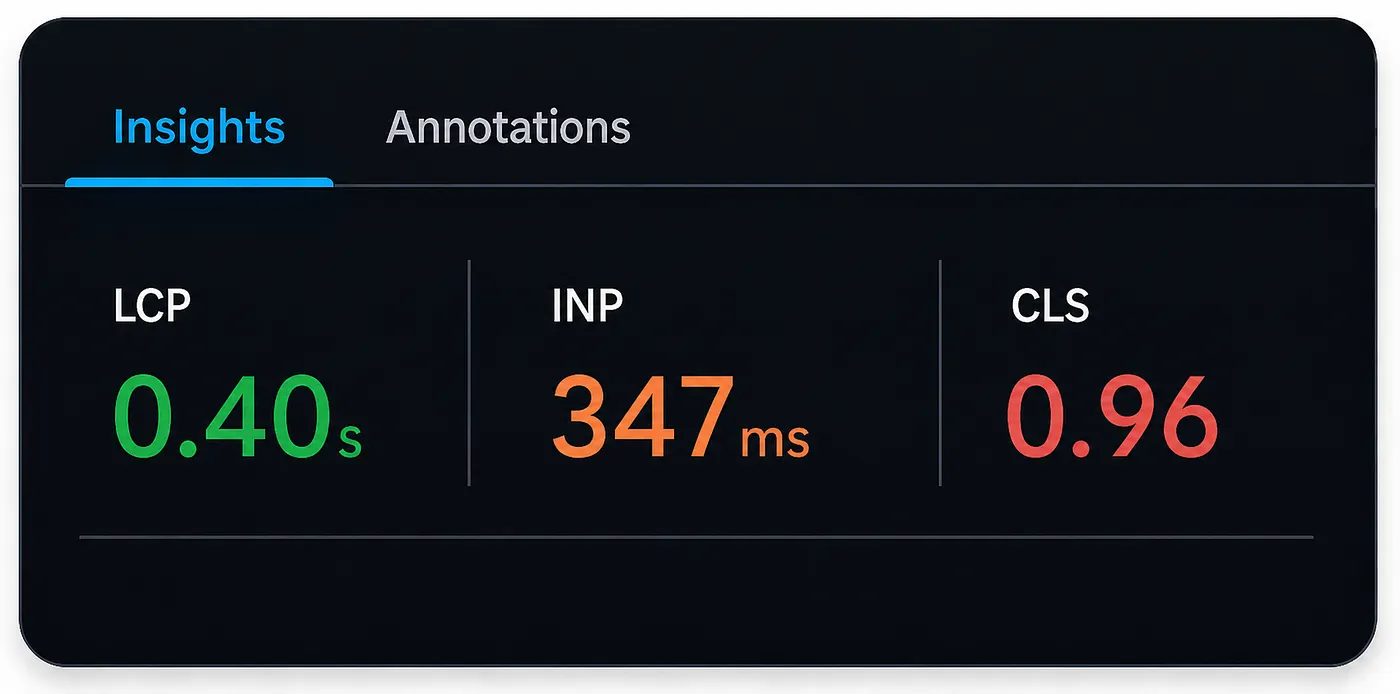
We moved INP from 3,034ms to 347ms, the UI became around 87% more responsive after user interaction. LCP also dropped from 27.34s to 0.40s, which, while not the most consistent metric in a Salesforce context, is still an improvement we contributed to.
Lightning Web Security & Lightning Locker
And I would like to end with a note about security and its effect on performance.
As you might have guessed, many of the capabilities shown today, especially modern browser capabilities such as IndexedDB, depend on Lightning Web Security being enabled.
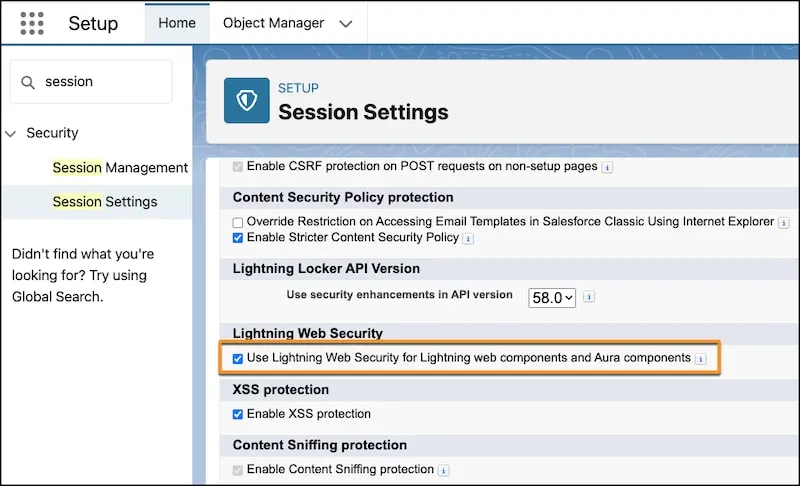
If Lightning Web Security is disabled, Salesforce falls back to the older Lightning Locker framework. Locker still provides security isolation, but it is more restrictive and can block or wrap access to some modern browser APIs.
If you are interested in a deeper look at these frameworks and how they work internally, check out this video where I explain the architecture in more detail.
For those who already understand what I am talking about, let me leave you with a few final tips.
- When working with Lightning Data Service or Apex, and especially when dealing with large amounts of data, consider cloning the returned data into your component sandbox before doing heavy client-side processing. This helps avoid repeatedly accessing host-owned data through JavaScript Proxy boundaries.
// Move data into the component sandbox.
const localData = JSON.parse(JSON.stringify(data));

// Now process local plain objects.
this.rows = localData.map(row => ({
   id: row.Id,
   name: row.Name,
   amount: row.Amount,
   stageName: row.StageName,
   closeDate: row.CloseDate,
   riskScore: this.calculateRisk(row)
}));
This pattern is not something you should blindly apply everywhere. For small datasets, it usually does not matter. But when you process, filter, sort, or transform large LDS or Apex responses on the client side, it can make a noticeable difference.
- When using IndexedDB or other modern browser APIs, make sure Lightning Web Security is enabled. Under Lightning Locker, some browser APIs will be restricted or wrapped, so the same code might not work as expected.
That’s all for today.
Don’t forget to follow for new updates, and contact me on LinkedIn if you have any questions, suggestions, or ideas to share.
Leave your questions in the comments. I’m happy to answer.

Comments
This is where you disagree
Comments are for subscribers, mostly to keep the noise down. It’s free to join and takes about a minute.