
While we’re still licking our wounds from Summer ’26 and the various security updates that ran us over several times this summer, it’s time to talk about the next stage of our suffering.
The Winter ’27 release is around the corner, and today we’re going to talk about the good things in this release that will give all developers a little dose of ecstasy.
Apex
One of the biggest surprises this time is the increase of the existing transaction heap size limit, which, just to be clear, does not happen very often.
Increased Apex Heap Size Limits
Now you are able to consume up to 10 MB (from 6 MB) of heap in a synchronous transaction, and up to 25 MB (from 12 MB) in asynchronous transactions.
The exact numbers are 10,000,000 and 25,000,000 bytes.
How to check heap size in Apex?
What it means is that now in Apex you can store much larger datasets in a single transaction, which helps a lot of old features to be resurrected and new features to be used even more broadly, as they receive more room to operate within.
It also helps with managing files in Salesforce.
You can now naturally retrieve larger files and if you’re using external storage: partial upload or download becomes faster, because one chunk of a file is simply bigger than it used to be.
And I haven’t even mentioned relatively new features like the Compression namespace, which was originally introduced to create and extract zip files, and which can now feel much more confident handling multiple files and compressing them into something that actually makes sense to your users.
// Synchronous
System.debug(Limits.getLimitHeapSize()); // 10000000
System.debug(Limits.getLimitCpuTime()); // 10000

// Inside a Queueable, Future and Batch execute()
System.debug(Limits.getLimitHeapSize()); // 25000000
System.debug(Limits.getLimitCpuTime()); // 60000
Now, so you wouldn’t get too excited about this, my takes:
- The CPU time limit has not been changed. It is still 10 seconds synchronous and 60 seconds asynchronous. You might be able to store large datasets and big media now, but that does not mean you will be able to process them. You’ll probably hit the CPU time just as good as you used to hit the heap size. Thank me for spoiling the party!
- I refuse to believe they were so worried about your and my struggling that they increased the heap size limit. It’s definitely because of AI, it has already given us things like the Models API to open a route for more interaction with LLMs and to give them more context from Apex, and I suspect there is much more coming in this direction, so Salesforce had to prepare itself for those changes by increasing the heap. Thank me for reminding you that your struggling makes no difference to the enterprise world!
Call HTTP Endpoints in Apex Tests (Developer Preview)
Another quite surprising upgrade goes to Apex test classes. In the new release, you’ll be able to create true integration tests and verify a real connection with third-party endpoints.
Unit testing validates small, isolated pieces of code, while integration testing verifies that components, services and external dependencies work together correctly.
Before this release, the idea of working with a third-party endpoint was simple: you create a mock for it and try to predict what result it might return, how authentication works and every edge case related to the service.
@IsTest
private class ExternalServiceCalloutTest {
    @IsTest
    private static void testHttpCallout() {
        // It's all fake and never triggers a real endpoint
        new HttpMock().get('/external/service').body('null').statusCodeBadRequest().mock();

        Test.startTest();
        HttpResponse result = ExternalServiceCalloutMock.getData();
        Test.stopTest();

        Assert.areEqual('null', result.getBody());
    }
}
In the Winter ’27 release, you are given an option to call a real HTTP endpoint right from your Apex test class, without creating any mock services at all.
// This works in Apex Tests
Http protocol = new Http();
HttpRequest request = new HttpRequest();
request.setEndpoint('callout:NamedCredential/verify/' + acc.Id);
request.setMethod('GET');
HttpResponse response = protocol.send(request);
It has slightly different syntax though, and requires a few annotations to be added to the class that behaves as an integration test.
@IntegrationTest
public class ExternalEndpointTest {
    @IntegrationTest
    public static void testExternalEndpoint() {
        // ...
    }
}If you want a little more interesting insights: Nothing rolls back.
I ran a few scenarios inserting records in @BeforeClass and a few more inside the test method, and after the run every single one of them was still sitting in the org.
Regular Apex tests roll back and you never think about it. Integration tests commit, and your org keeps whatever you inserted.
Which is exactly why @TearDown is something you'd like to use:
@IntegrationTest
public with sharing class ExternalEndpointTest {
    @BeforeClass
    public static void setup() {
        Account newCompany = new Account(Name = 'PaymentTestAccount');
        insert as user newCompany;
    }

    @IntegrationTest
    public static void testExternalEndpoint() {
        Account acc = [
            SELECT Id
            FROM Account
            WHERE Name = 'PaymentTestAccount'
            WITH USER_MODE
        ];

        Http protocol = new Http();
        HttpRequest request = new HttpRequest();
        request.setEndpoint('callout:PaymentGateway/verify/' + acc.Id);
        request.setMethod('GET');
        HttpResponse response = protocol.send(request);

        Assert.areEqual(200, response.getStatusCode());
    }

    @TearDown
    public static void tearDown() {
        delete [SELECT Id FROM Account WHERE Name = 'PaymentTestAccount'];
    }
}
For all the updates, retirements and more security updates, head over to the Posts tab to stay up to date on what could break your organization.
Additional Limits for Batch Apex (Beta)
Your organization has a rolling 24-hour limit on how many asynchronous Apex jobs it can run. Once you cross it, new jobs are rejected and your code receives a limit exception.
Elastic limits change what happens at that point.
Instead of rejecting jobs the moment you reach the standard limit, the org keeps accepting them and reduces the processing rate instead.
The idea itself is not new. Summer ’26 introduced elastic limits for Queueable jobs and future methods. What Winter ’27 adds is Batch Apex.
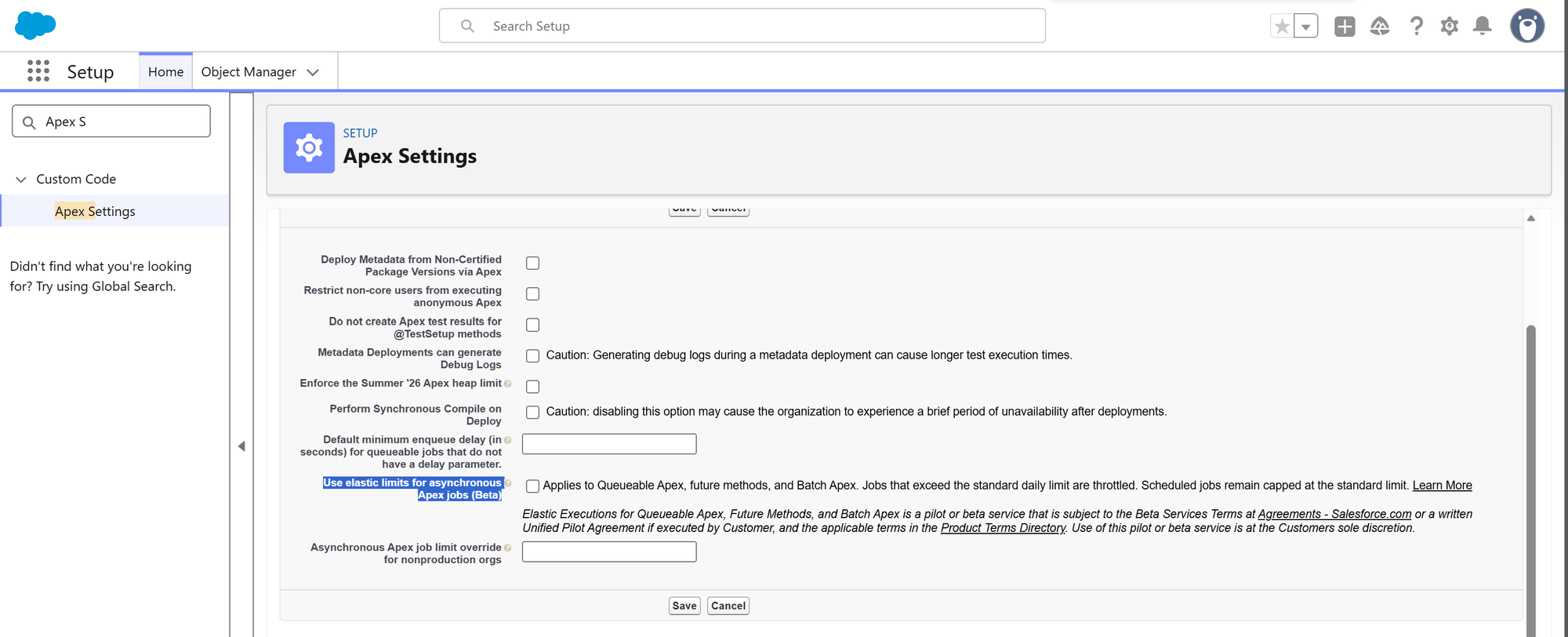
You’ll find the switch in Setup → Custom Code → Apex Settings → Use elastic limits for asynchronous Apex jobs (Beta). Hover over the help icon next to it and the org gives you your own numbers. With the setting off, it says:
The elastic limits setting is disabled. Your standard asynchronous job limit is N jobs executed per 24-hour period.
And with the setting on, it says:
The elastic limits setting is enabled. Your elastic asynchronous job limit is N+E jobs executed per 24-hour period.
Me personally, I have never hit those limits in my entire life. And if you do, most likely you’re doing something wrong with the architecture or implementation of your Salesforce organization. For those, you can read more about how to design an org that does not suck here: Design Your Org The Right Way
Apex Symbol API (Beta)
This one will primarily help your AI agents to understand Salesforce better.
It gives you a new endpoint /services/data/vXX.0/tooling/symbols, which you or your agent can call to retrieve detailed information about the standard and custom Apex classes, interfaces and triggers that are available for use.
GET /services/data/v68.0/tooling/symbols?category=builtin&namespace=System&name=ApexPages
Authorization: Bearer <session-id>
The category parameter is mandatory and takes builtin, database or dynamic.
What comes back is everything the compiler knows about the type: every method, every parameter, every modifier and every annotation.
It also reads your ApexDoc. The @description tag becomes the leading text, and every @param is pulled out a second time into the parameter it belongs to:
{
  "name": "snapshot",
  "returnType": { "name": "String" },
  "documentation": "Builds a one-line snapshot of the current governor limits.\n@param ctx ...",
  "parameters": [
    { "name": "ctx", "documentation": "A label identifying the execution context." }
  ]
}
So you don't write ApexDoc, an agent reading this API has nothing to work with beyond your method names, and we all know how descriptive your methods are.
I have no clear opinion on this capability yet. It needs time to show itself and whether it does bring a benefit.
That said, the fact that Salesforce APIs are extending is definitely good news, and I’ll be posting updates on the Posts section of this newsletter to keep you informed.
API Versions Retirement
We also have a retirement coming for old Apex.
If you’re using classes and triggers marked with versions 9.0 through 19.0, first of all, you suck. Second of all, you must upgrade those classes to a newer version to avoid any compilation errors moving forward.
To help you with identifying them, Salesforce now returns a warning when you compile or deploy at those versions:
LegacyWarnProbe: 1,14 SEVERE [1:14]: Apex API version 16.0 is scheduled for
retirement. Update to the latest API version to avoid compilation errors.
Salesforce CLI
The command-line interface has no such exciting updates this time, and mostly has small changes to current behavior which will not affect you. Maybe 😊
Credentials are no longer printed in command output
As of CLI 2.136.8, org display, org list --json, org create scratch --json and several login commands stopped returning secrets. What you get instead is this:
"accessToken": "[REDACTED] Use 'sf org auth show-access-token' to view"Use Unverified Email Domains in Scratch Orgs
Not that long ago, Salesforce has introduced a new restriction to its email service restricting users from sending emails from unverified email domains.
We all went through this enforcement and activated quite a few DKIM keys for each domain that is being used in the org.
That rule makes sense in production, and it is extremely annoying in a scratch org you are going to delete in a few days. So the CLI added a switch for it:
{
  "orgName": "Winter27 Unverified Domains",
  "edition": "Developer",
  "settings": {
    "emailAuthorizationSettings": {
      "enableSubstituteFromAddress": true
    }
  }
}
What I notices is that if you retrieve EmailAuthorizationSettings from a Winter ’27 scratch org that was created without that setting, it comes back as true anyway.

So it is already on by default, and Messaging.sendEmail goes through either way.
SOQL
There is exactly one new thing in here, it is a beta, and it does not work in any org I could put it into.
Compare Values Between Fields in SOQL (Beta)
The feature here is FORMULA(), which lets you do arithmetic directly in a WHERE clause and compare two fields against each other, without creating a formula field.
SELECT Id, Name FROM Opportunity
WHERE FORMULA(Amount - ExpectedRevenue) > 0
That's good... I'd say if it worked for me.
The release notes say the beta is available in sandboxes, Developer Edition and scratch orgs on API 68.0 and later.
And yet, if you run that query in a Winter ’27 preview org or in a freshly created Winter ’27 Developer Edition scratch org, every one of those routes gives you the same answer:
MALFORMED_QUERY: unexpected token: 'FORMULA(AnnualRevenue -'So I can’t vouch for it in practice yet. But on paper, it looks really good, and I will definitely keep an eye on it.
Lightning Web Components
Lightning Web Components did not receive anything dramatically new this time. Instead, this is the release where a couple of things that have been sitting in beta for a while finally became generally available (GA).
Use Complex Template Expressions (Generally Available)
Complex JavaScript expressions inside HTML templates went beta in Spring ’26 and are generally available now. I've already said on LinkedIn that you have to be very careful with this, and it's always better to consolidate logic into JavaScript only, but for small things - I suppose it works.
<template>
    <p>{items.length > 2 ? 'many' : 'few'}</p>
    <p>{`${firstName} ${lastName}`}</p>
    <p>{contact?.account?.name}</p>
    <p>{label.toUpperCase()}</p>
</template>
More interesting is where the wall actually is. These five are rejected:
| Expression | Compiler |
|---|---|
{count = 5} |
Field mutations are only permitted within arrow functions |
{count++} |
Field mutations are only permitted within arrow functions |
{new Date().getFullYear()} |
Use of object instantiation is disallowed |
{(count, label)} |
Use of comma operators is disallowed |
The pattern behind it is actually simple. If an expression mutates state or creates an object - it is rejected. If it only reads and calculates - it is allowed.
What the compiler does not check though, is whether the thing you are referencing actually exists. Inside a template expression you only have access to your own component, and every global is undefined in there, including window, document, Math and JSON.
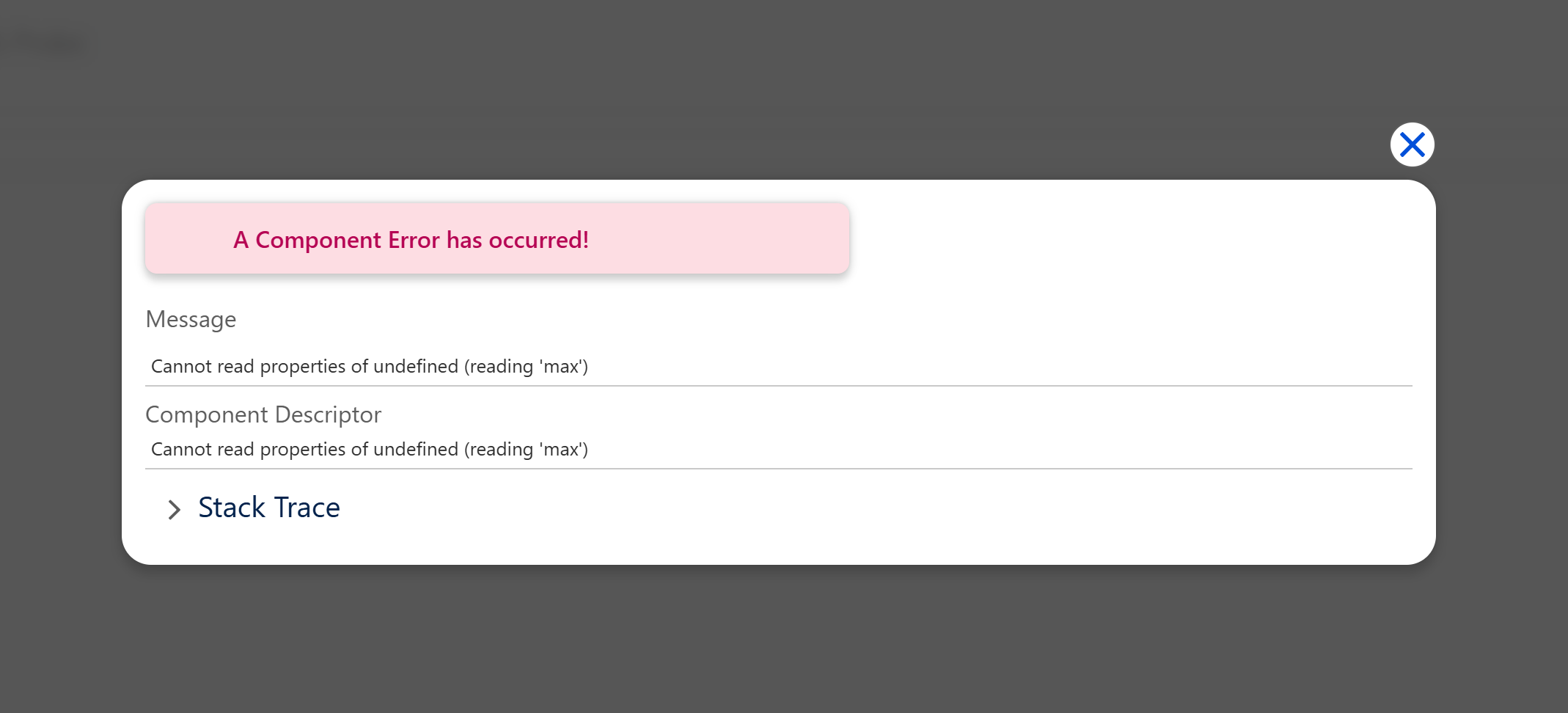
So you have to be extremely precise about what you put in those expressions, and reference only the properties that actually exist on your component.
Use Third-Party Web Components in LWC (Generally Available)
You can now render third-party custom elements inside LWC templates without rewriting them, by using lwc:external. This one is also generally available with no changes since the last beta.
The way it works is you upload the already-built JavaScript file and then load it at runtime with loadScript from lightning/platformResourceLoader.
It has to be a plain browser bundle in IIFE or UMD format, because loadScript does not support ECMAScript modules, and you cannot import a web component from npm into your LWC bundle either.
import { LightningElement } from 'lwc';
import { loadScript } from 'lightning/platformResourceLoader';
import FANCY from '@salesforce/resourceUrl/fancyWidget';

export default class ExternalWidget extends LightningElement {
    hasLoaded = false;

    renderedCallback() {
        if (this.hasLoaded) {
            return;
        }

        this.hasLoaded = true;

        loadScript(this, FANCY).catch((error) => {
            // ...
        });
    }
}
And the template, where the only new thing is the directive itself:
<template>
    <fancy-widget lwc:external data-label="external"></fancy-widget>
</template>
Control Navigation Items in Lightning Console Apps
The last one is a capability that must have been released waayy back in the day.
The lightning/platformNavigationItemApi module is the LWC equivalent of the old lightning:navigationItemAPI Aura component, and it gives you five methods:
import {
    getNavigationItems,
    getSelectedNavigationItem,
    setSelectedNavigationItem,
    focusNavigationItem,
    refreshNavigationItem
} from 'lightning/platformNavigationItemApi';

// ...

const items = await getNavigationItems();
await setSelectedNavigationItem('standard-Account');
It only works in Lightning console apps, so there is nothing to see outside of one, but if you have been keeping an Aura component alive purely to reach the item menu - you can finally delete it.
Farewell, Aura.
Where that leaves us
Winter ’27 is a small release with a few genuinely a few good things: a bigger heap, integration tests that talk to external systems, template expressions that I suggest you avoid, and an API that hands your whole type system over to an agent.
This is good. This walkthrough was supposed to be good and not too pessimistic, so I kept that promise...
So why don’t I leave it entirely up to you? As long as you remember one simple rule: the fact that a feature exists doesn’t mean you should use it. The fact that a feature doesn’t exist doesn’t mean you shouldn’t blame Salesforce.

Comments
This is where you disagree
Comments are for subscribers, mostly to keep the noise down. It’s free to join and takes about a minute.