Tomorrow, October 21, 2026, Salesforce starts rolling out security updates to how your integrations work.
It has been a while, and I had already started worrying they'd figured out we have actual features to build. No reason to worry, though: they did not forget, and here we are again.
Over the coming weeks and months, Salesforce will be tightening the rules for integrations across sandbox and production environments to deliver a few improvements:
Refresh tokens expire after 30 days without use, in sandboxes starting October 21 and in production starting November 4.
The OAuth device flow works only from local External Client Apps with a localhost callback, starting November 30.
The username-password, user-agent and hybrid user-agent flows are retired on February 20, 2027.
As you might have heard, on Friday Marc Benioff officially renamed AIForce to SIForce. This follows the U.S. administration’s executive order that tells federal agencies to replace “Artificial Intelligence” with “Super Intelligence”.
(And by “officially” I mean a post on X)
In case you missed it, AIForce was announced at Dreamforce 2026. It’s mostly a marketing layer that combines capabilities such as Headless 360, hosted MCP servers, APIs, skills and plugins. Everything we’ve known about for quite some time just got an extra layer on top and was packaged together as AIForce.
Now AIForce becomes SIForce, and we should expect other products to be renamed around the Super Intelligence name as well.
Winter ‘27 Is Live
As for the more exciting news, the last release weekend was October 10, so Winter ‘27 has now officially landed in all production environments.
Profile Filtering has been an optional setting since Winter ‘21, but Winter ‘27 now turns it on through a release update. If Profile Filtering is enabled under User Management Settings in your org, and Manage Profiles and Permission Sets is set to Raise session to high assurance under Identity Verification settings, your Metadata API calls that retrieve CustomObject might fail with a Salesforce error.
For example, a simple retrieve like this one is enough to run into it:
September 16, 2026, was expected to be a successful second day of Dreamforce, uncovering more headless capabilities for our AI Agents to communicate with Salesforce and use its capabilities without needing to log in to Salesforce directly.
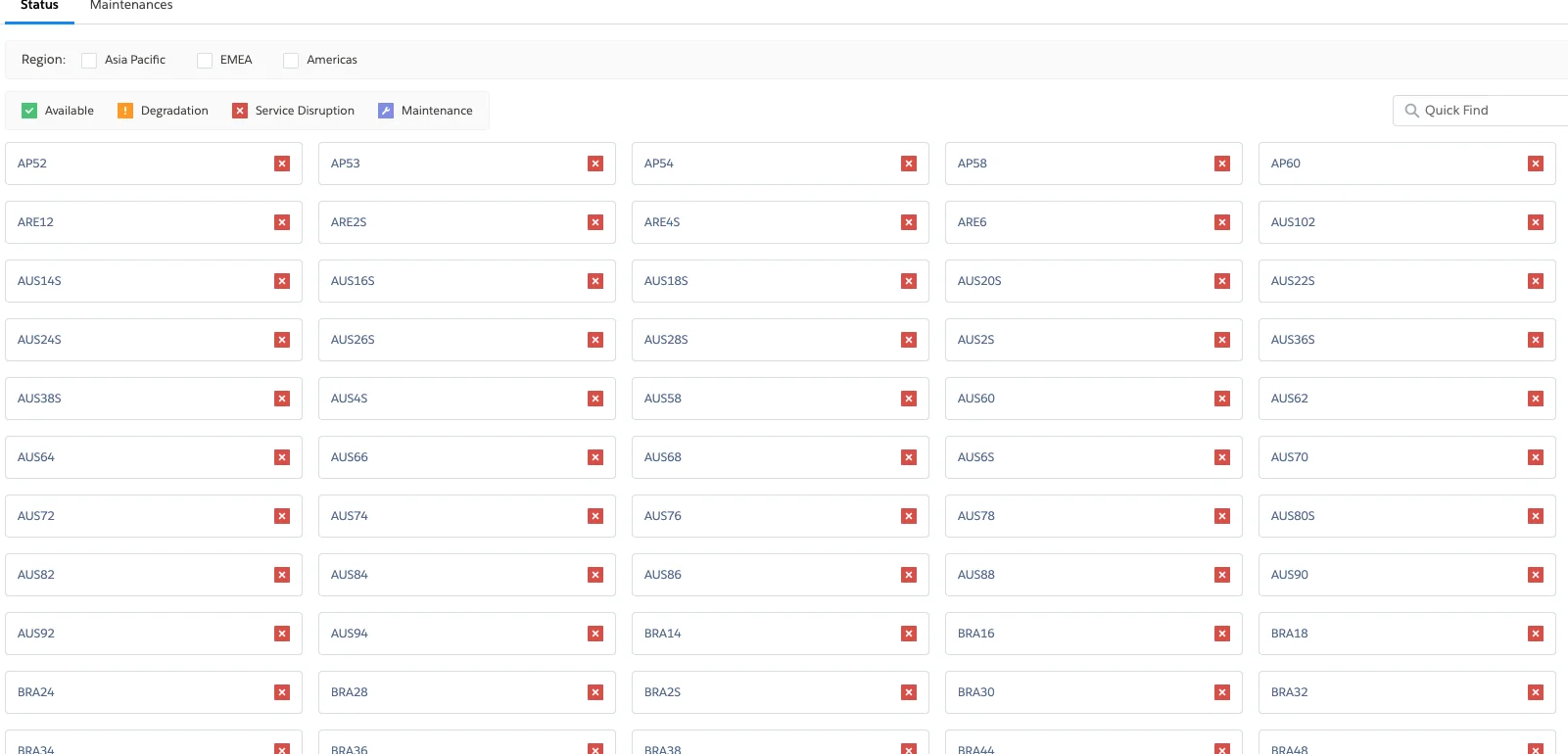
Instead, it all started with one of Salesforce's biggest outages, gifting customers across all regions with severe delays and the inability to access Salesforce at all.
Indeed. Considering all the announcements, why would you even need to log in to Salesforce? It's a headless era and September proved it to be quite headless.
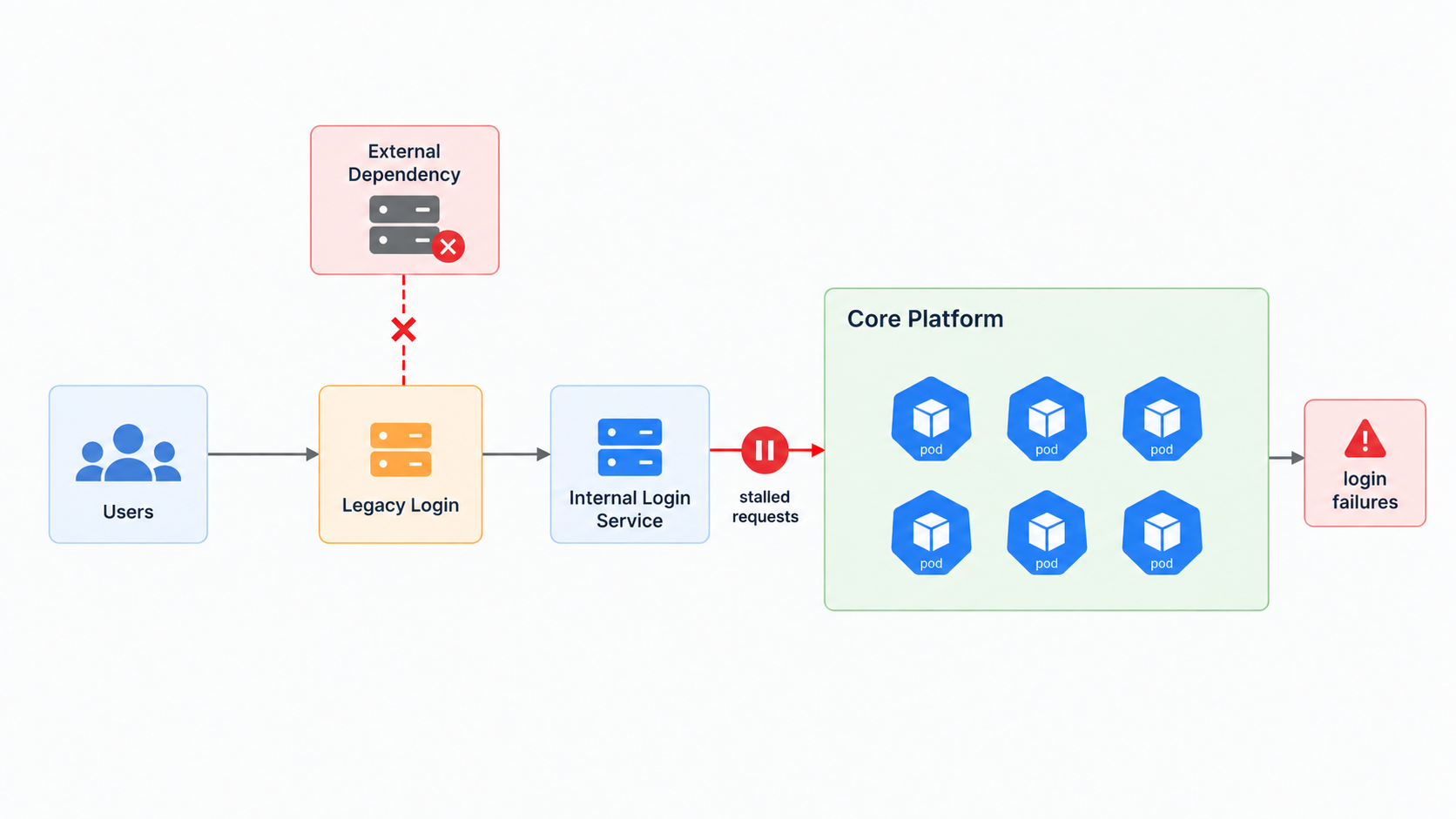
During the incident, Salesforce reported that requests were stalling while waiting for a response from an internal login service, consuming available server resources.
Shortly after, Salesforce said it believed an external dependency failure was affecting the legacy login server. A core system component then experienced increased load and could no longer process requests at the required capacity.
This incident occurred literally a few hours after the announcement of AIforce, a product name bringing Salesforce's headless capabilities under a single product direction and promoting even more headless interaction with Salesforce.
Quite timely, I must say.
All things aside though, this incident proves that underneath all that AI revolving machine of progress and probabilistic thinking, we still have good old technologies and dependencies which, at the end of the day, can make a bigger impact than any AI capability introduced into the ecosystem.
Not to mention that I have a feeling AI coding had its place somewhere in this incident, but let's stay away from speculation.
Instead, I highly encourage all of you to have a mitigation plan for Salesforce outages.
Have a checklist to notify users about an outage in a timely manner, explain how they should proceed without Salesforce and determine how you will push back any data that may have been drafted elsewhere during those hours of downtime.
Think about what a Salesforce outage means for your business and how you will mitigate the impact. If you have none - you have no idea what you're doing.
And this is not a unique outage.
Over the last few weeks, Revenue Cloud alone has suffered several significant problems. They obviously don't receive the same level of attention, but they prove exactly the same point: there are still plenty of dependencies and moving parts behind the scenes and we need to be prepared when one of them fails.
A few days ago, I published my theory that the retirement of the SOAP API login() method would start affecting existing integrations in the upcoming Winter ’27 release, not just Summer ’27 as most people were assuming.
You called me crazy. You said nobody was telling us that.
Well... Today, I confirmed it.
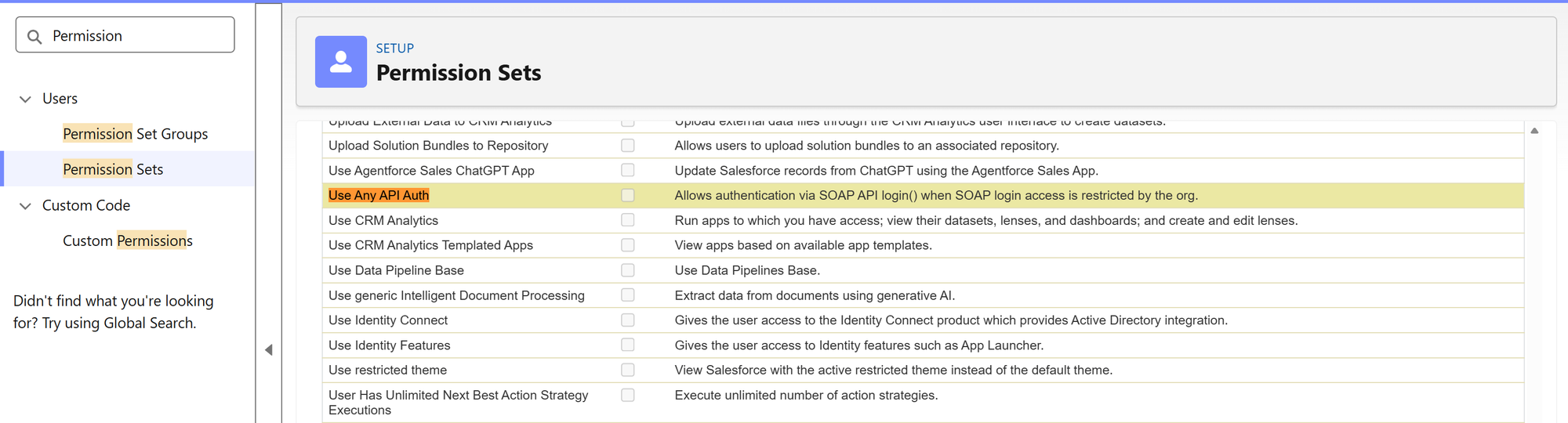
Existing integrations using SOAP API login() can no longer authenticate in Winter ’27 unless the user has a new permission called Use Any API Auth.
You can find it in a permission set by navigating to:
Permission Sets → System Permissions → Use Any API Auth
Any user trying to authenticate using SOAP API login() without this permission will be rejected with the following error:
INSUFFICIENT_ACCESS: SOAP API login() requires the Use Any API Auth user permission
How to Find Who Is Still Using SOAP API login()
Before assigning the permission to anyone, you first need to identify which integrations are still using login().
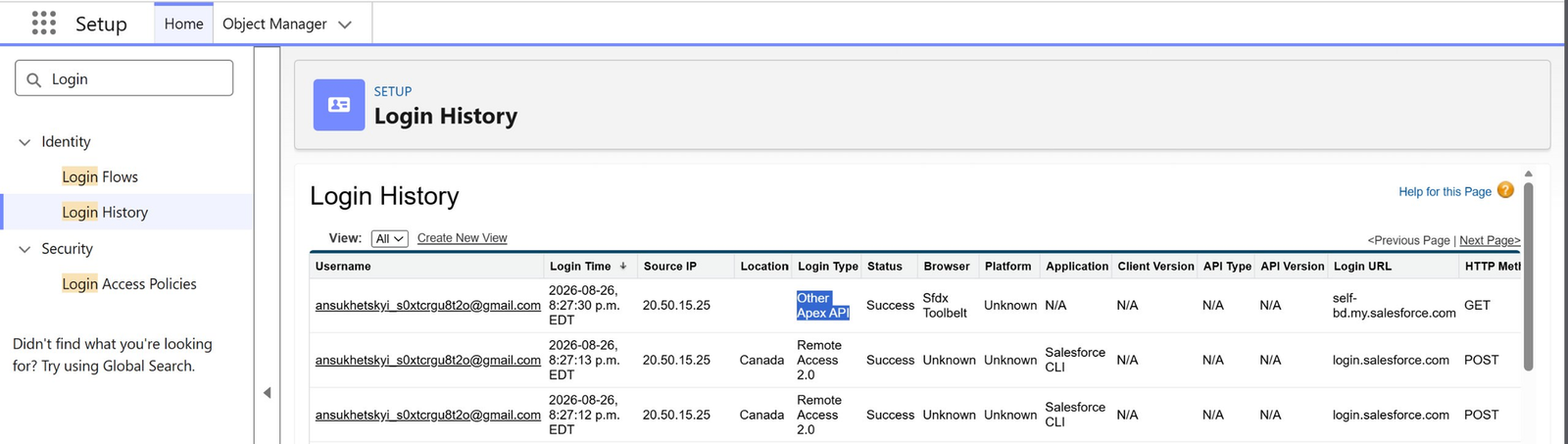
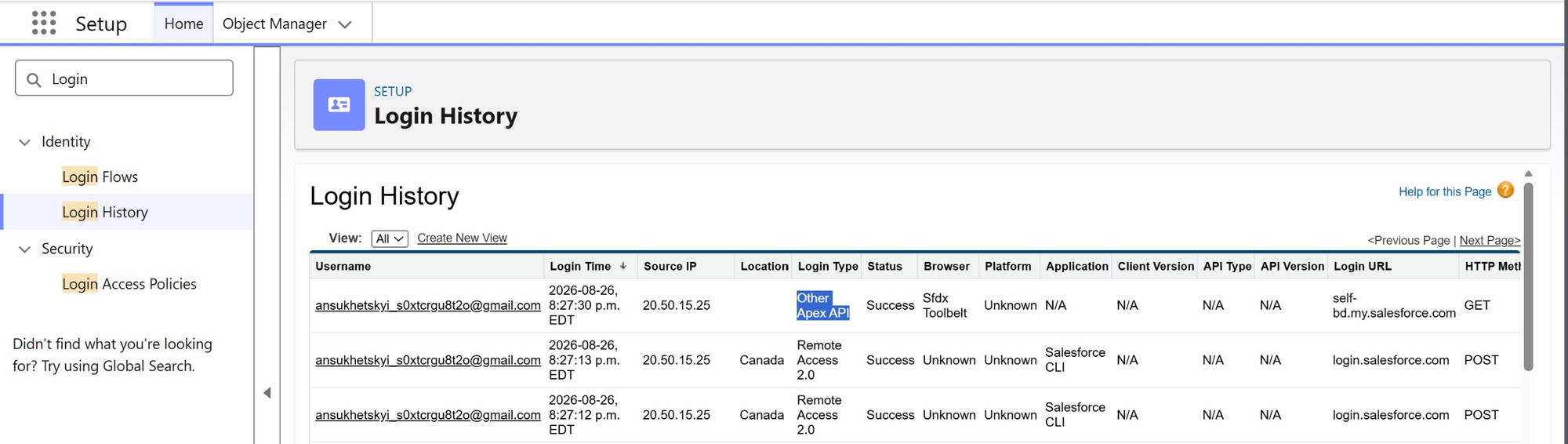
Go to: Setup → Login History
You can review the records there or download the login history as a CSV file.
Look for entries where:
Login Type is Other Apex API or Partner Product
Login Subtype is SOAP API
API Type is SOAP Enterprise, SOAP Partner or SOAP Tooling
Those entries represent applications authenticating through SOAP API login(). The Username tells you which Salesforce user is being used by the integration.
And don't be surprised if the Application field says N/A. That's expected. SOAP API login() isn't tied to a Connected App or External Client App, which is kind of the whole problem here.
If you need to investigate further, you can use the API Total Usage EventLogFile.
Look for events where:
API_FAMILY = SOAP
API_RESOURCE = login
The USER_NAME identifies the user, while CLIENT_NAME can help identify the actual application.
What You Should Do Before Winter ’27
Review your Login History and identify every user still authenticating through SOAP API login().
If you can't migrate those integrations just yet, create a dedicated permission set containing Use Any API Auth and assign it only to the users that actually need it.
That will keep those integrations alive through Winter ’27.
But don't get too comfortable with it. In Summer ’27, SOAP API login() in API versions 31.0 through 64.0 will be retired once and for all. At that point, there will be no permission you can assign and no checkbox you can enable to keep it alive a little longer.
As you might know, Salesforce is retiring the SOAP API login() method that external systems use to authenticate into your Salesforce organization.
It's a legacy method that some of your systems might still be using to get into Salesforce, and considering it's an extremely dumb and insecure way of doing it (just a plain username and password), it's indeed a good decision to get rid of it.
This enforcement is scheduled for Summer '27 and will make API versions 31.0 through 64.0 unavailable, returning an error saying:
The Lord of the Rings | You Shall Not Pass
And before you scroll away, STOP. Maybe your organization will stop working already after Winter '27.
The existing Salesforce documentation, as of the second I'm writing this post, is extremely confusing (as always) and might give us a hint that starting Winter '27, your users must have a specific permission to keep the SOAP API login() method working until Summer '27.
YES, I KNOW, PLEASE BEAR WITH ME!
Winter '26 Release Notes
This is an older release, from last year.
Back in a day, Salesforce publishes a release note saying that all versions starting from 65.0 won't have the SOAP API login() method working at all.
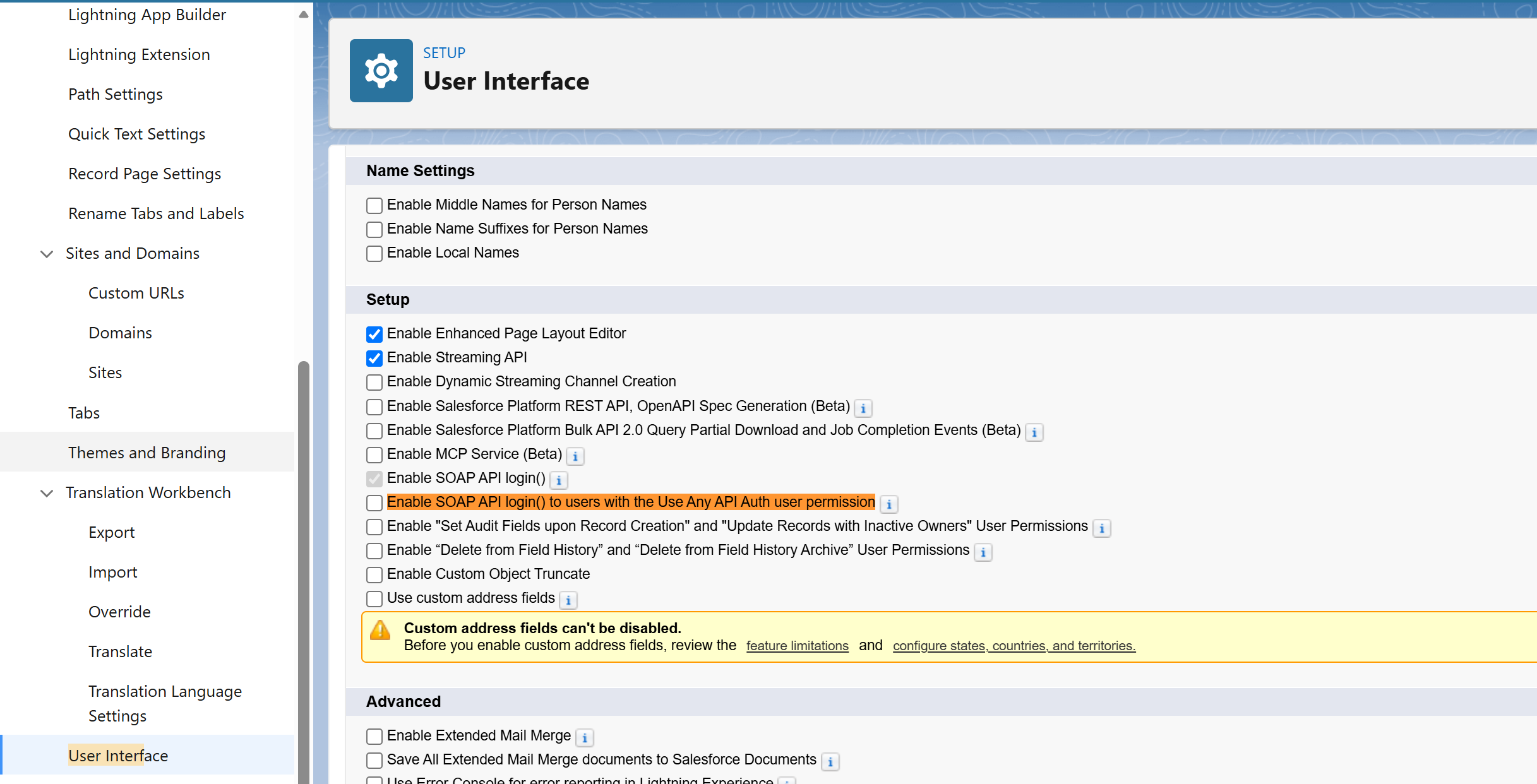
The release right before Winter '27. This summer. Salesforce introduced a new checkbox under User Interface named "Enable SOAP API login() to users with the Use Any API Auth user permission".
Setup | User Interface
Activate it, and the SOAP API login() method stops working for all users EXCEPT those who have the Use Any API Auth permission. That permission is also a new one, introduced in this very release.
And then in the upcoming Winter '27 release notes, I quote: "To authenticate with the SOAP API login() operation, all users must have the Use Any API Auth user permission assigned to them".
If my interpretation is correct, it means that all your SOAP API login() integrations will break not in Summer '27 as you all assume, but literally in a few weeks with Winter '27, unless you assign that permission.
You might say I am overreacting, but why would you then publish this release page in the first place? Like, the checkbox is there, the permission is there, there is nothing new unless you now enforce having this permission attached. Just look at the reference.
Winter '27 will break your SOAP API login() integrations and will give you a way to repair them quickly. The problem is, if it weren't for me, you would still be in for the downtime.
On that note, I recommend looking into this already today. To identify all SOAP API usage, you shall:
Look into your inbox. Salesforce must have sent you an email a couple of months ago saying that they identified that your org has been accessed using SOAP API login().
Go to Login History and look for "Other Apex API", "Partner Product" or "SOAP API". If any of these are present, you can track back the user and then see which integration is using this older authentication method.
Setup | Login History
Finally, verify that all your AppExchange packages are updated and not using those older authentication methods. This is really easy to overlook, as you usually don't think of it.
To help you communicate with other teams, share with them that their code most likely looks something like this:
ConnectorConfig config = new ConnectorConfig();

config.setUsername("integration@example.com");
config.setPassword("passwordSECURITY_TOKEN");
config.setAuthEndpoint("https://YourDomainName.my.salesforce.com/services/Soap/c/41.0/");
The idea behind such integrations is simple. If your external application is accessing Salesforce with a username and password only — that's bad. It's either SOAP API login() or OAuth username-password, both of which are on their way out as we speak.
I'll keep you updated once we get Winter '27 in our sandboxes and whether my detective masterpiece is truthful.
While working with AI Agents, there is a popular saying: "Never trust one model to behave exactly like another".
This is my saying. It's not popular yet, but now it's destined to be.
On October 20, 2026, Google retires Gemini 2.5 Pro, 2.5 Flash, and 2.5 Flash-Lite. Salesforce documents the change in the Winter '27 release notes: requests to those models get rerouted automatically.
You should pay attention if you're using:
Agentforce agents or subagents with an Agent Script model_config pointing to one of the older Gemini 2.5 models.
Prompt Builder templates using Gemini 2.5.
Custom solutions using the Models API with Gemini 2.5.
If your org just runs the Salesforce Default model option for Agentforce, you're out of scope. This is about the places where somebody explicitly chose Gemini.
So if you're using any of these models, test your prompts and Agentforce behavior against the replacement models before the reroute. And if the results disappoint you – choose your own target instead of inheriting the default one.
For agents specifically, Salesforce calls out GPT 4.1, Claude Haiku 4.5 and Gemini 3.5 Flash as the models it has "thoroughly" tested.